01
Describe your part
Give it a shape, dimensions, and a purpose. Include hole sizes, wall thickness, and the details that matter.
 Text to STEP.Open LovCAD
YOUR NEXT PART STARTS WITH A SENTENCE
Describe the part you have in mind. Create and refine it in LovCAD, then export a STEP file for the next stage of your CAD workflow.
Start creating in LovCADOpens LovCAD · Create, refine, export
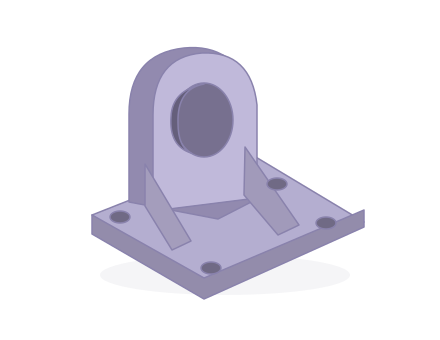
“A mounting bracket with four holes,
rounded edges, and a central bore.”
01 / THE WORKFLOW
Keep the idea moving. Start with a clear description, inspect the result, and take the geometry into your CAD workflow.
Give it a shape, dimensions, and a purpose. Include hole sizes, wall thickness, and the details that matter.
Use LovCAD to generate a starting model. Inspect it from every angle and refine the dimensions or model source.
Export STEP from LovCAD. Open the file in your CAD software to check fit, develop the design, and plan the next step.
02 / BUILT TO GO FURTHER
STEP carries 3D geometry between CAD tools. For mechanical parts, LovCAD offers exact surface STEP export, so the model can become a useful starting point for further design.
Move beyond a rendered image. Bring surfaces and solids into a CAD environment where you can inspect and develop your part.
Specify a bore diameter, a mounting pattern, or a wall thickness. Clear dimensions give your first model a better starting point.
Use STEP to exchange geometry with tools such as Fusion and SolidWorks. Always check the imported model before using it.
STEP → Your next design step
03 / A LITTLE INSPIRATION
A few ideas to get your first prompt going. These are illustrative design briefs, not verified manufacturing files.
“An L bracket, 60 mm wide, with two mounting holes and a reinforced corner.”
“A cylindrical spacer, 30 mm outer diameter, with a 12 mm bore and 20 mm height.”
“A compact enclosure with a removable lid, four screw holes, and a cable opening.”
Text to STEP is a workflow that turns a written description into a 3D CAD model and exports it as a STEP file. Start with the shape and dimensions, generate and refine the model in LovCAD, then export the geometry.
This page introduces the text to STEP workflow. Every create button opens the LovCAD homepage, where you can access the modeling tools. This page does not generate or store your models.
Describe the part, its intended use, units, overall dimensions, holes, thicknesses, and any important clearances. Start with a simple part and refine one detail at a time.
STEP is widely supported by CAD software, including Fusion and SolidWorks. LovCAD distinguishes exact surface STEP for mechanical parts from mesh based STEP for geometry projects. Check which project type and export your design uses; STEP transfer does not guarantee a native feature history.
You can begin with a plain language description. CAD experience helps you assess geometry and refine more complex designs. Visit LovCAD for its current account requirements, plans, and usage limits.
Treat the result as a design starting point. Verify dimensions, tolerances, fit, material, and manufacturing constraints. Have critical parts reviewed by a qualified engineer before production.
FROM THE FIRST WORD TO THE NEXT PART
Bring your idea to LovCAD. Leave with a model you can build on.
Start creating in LovCADYour next step opens at lovcad.com